1️⃣ 실습 환경 조성
✔️ kind k8s(1.32.2) 배포
control-plane, worker-node 2대
kind code는 아래와 같다.
kind: Cluster
apiVersion: kind.x-k8s.io/v1alpha4
nodes:
- role: control-plane
  extraPortMappings:
  - containerPort: 30000 # Sample Application
    hostPort: 30000
  - containerPort: 30001 # Prometheus
    hostPort: 30001
  - containerPort: 30002 # Grafana
    hostPort: 30002
  - containerPort: 30003 # Kiali
    hostPort: 30003
  - containerPort: 30004 # Tracing
    hostPort: 30004
  - containerPort: 30005 # kube-ops-view
    hostPort: 30005
- role: worker
- role: worker
networking:
  podSubnet: 10.10.0.0/16
  serviceSubnet: 10.200.1.0/24
PS C:\CODE\kubernetes\istio\manifest\final> kind create cluster --name myk8s --image kindest/node:v1.32.2 --config .\kind.yaml
Creating cluster "myk8s" ...
• Ensuring node image (kindest/node:v1.32.2) 🖼 ...
✓ Ensuring node image (kindest/node:v1.32.2) 🖼
• Preparing nodes 📦 📦 📦 📦 ...
✓ Preparing nodes 📦 📦 📦 📦
• Configuring the external load balancer ⚖️ ...
✓ Configuring the external load balancer ⚖️
• Writing configuration 📜 ...
✓ Writing configuration 📜
• Starting control-plane 🕹️ ...
✓ Starting control-plane 🕹️
• Installing CNI 🔌 ...
✓ Installing CNI 🔌
• Installing StorageClass 💾 ...
✓ Installing StorageClass 💾
• Joining more control-plane nodes 🎮 ...
✓ Joining more control-plane nodes 🎮
• Joining worker nodes 🚜 ...
✓ Joining worker nodes 🚜
Set kubectl context to "kind-myk8s"
You can now use your cluster with:
kubectl cluster-info --context kind-myk8s
Not sure what to do next? 😅 Check out https://kind.sigs.k8s.io/docs/user/quick-start/
# 노드에 기본 툴 설치
fish@jellyfish:~$ for node in control-plane worker worker2; do echo "node : myk8s-$node" ; docker exec -it myk8s-$node sh -c 'apt update && apt install tree psmisc lsof ipset wget bridge-utils net-tools dnsutils tcpdump ngrep iputils-ping git vim -y'; echo; done
# (옵션) kube-ops-view
helm repo add geek-cookbook https://geek-cookbook.github.io/charts/
helm install kube-ops-view geek-cookbook/kube-ops-view --version 1.2.2 --set service.main.type=NodePort,service.main.ports.http.nodePort=30005 --set env.TZ="Asia/Seoul" --namespace kube-system
kubectl get deploy,pod,svc,ep -n kube-system -l app.kubernetes.io/instance=kube-ops-view
✔️ kind docker network 에 테스트용 PC(실제로는 컨테이너)
# kind 설치 시 kind 이름의 도커 브리지가 생성된다 : 172.20.0.0/16 대역
PS C:\CODE> docker network ls
NETWORK ID     NAME                            DRIVER    SCOPE
ef5a3db79f8e   bridge                          bridge    local
b84c653a8dea   host                            host      local
89642778a6f1   kind                            bridge    local
...

PS C:\CODE> docker inspect kind
...
        "IPAM": {
            "Driver": "default",
            "Options": {},
            "Config": [
                {
                    "Subnet": "172.20.0.0/16",
                    "Gateway": "172.20.0.1"
...

# '테스트용 PC(mypc)' 컨테이너 기동
# kind 도커 브리지를 사용하고, 컨테이너 IP를 지정 혹은 지정 없이 배포
PS C:\CODE> docker run -d --rm --name mypc --network kind --ip 172.20.0.100 nicolaka/netshoot sleep infinity
770c80a797fee2950c6f0b891ca7682df747cfc2da20a90c7962e5ecff2f46bc

PS C:\CODE> docker ps
CONTAINER ID   IMAGE                                COMMAND                   CREATED          STATUS          PORTS                                                             NAMES
770c80a797fe   nicolaka/netshoot                    "sleep infinity"          14 seconds ago   Up 13 seconds                                                                     mypc
bf69e635eeef   kindest/haproxy:v20230606-42a2262b   "haproxy -W -db -f /…"   9 minutes ago    Up 9 minutes    127.0.0.1:59948->6443/tcp                                         myk8s-external-load-balancer
fad81e78ed78   kindest/node:v1.32.2                 "/usr/local/bin/entr…"   9 minutes ago    Up 9 minutes                                                                      myk8s-worker2
c0acf4d77b76   kindest/node:v1.32.2                 "/usr/local/bin/entr…"   9 minutes ago    Up 9 minutes    127.0.0.1:59950->6443/tcp                                         myk8s-control-plane
d3b89e87dda6   kindest/node:v1.32.2                 "/usr/local/bin/entr…"   9 minutes ago    Up 9 minutes                                                                      myk8s-worker
f675a10956a6   kindest/node:v1.32.2                 "/usr/local/bin/entr…"   9 minutes ago    Up 9 minutes    0.0.0.0:30000-30005->30000-30005/tcp, 127.0.0.1:59949->6443/tcp   myk8s-control-plane2

# kind network 중 컨테이너(노드) IP(대역) 확인
fish@jellyfish:~$ docker ps -q | xargs docker inspect --format '{{.Name}} {{.NetworkSettings.Networks.kind.IPAddress}}'
/mypc 172.20.0.100
/myk8s-external-load-balancer 172.20.0.6
/myk8s-worker2 172.20.0.2
/myk8s-control-plane 172.20.0.4
/myk8s-worker 172.20.0.3
/myk8s-control-plane2 172.20.0.5
✔️ MetalLB 배포
# MetalLB 배포
PS C:\CODE> kubectl apply -f https://raw.githubusercontent.com/metallb/metallb/v0.14.9/config/manifests/metallb-native.yaml
namespace/metallb-system created
customresourcedefinition.apiextensions.k8s.io/bfdprofiles.metallb.io created
customresourcedefinition.apiextensions.k8s.io/bgpadvertisements.metallb.io created
customresourcedefinition.apiextensions.k8s.io/bgppeers.metallb.io created
customresourcedefinition.apiextensions.k8s.io/communities.metallb.io created
customresourcedefinition.apiextensions.k8s.io/ipaddresspools.metallb.io created
customresourcedefinition.apiextensions.k8s.io/l2advertisements.metallb.io created
customresourcedefinition.apiextensions.k8s.io/servicel2statuses.metallb.io created
serviceaccount/controller created
serviceaccount/speaker created
role.rbac.authorization.k8s.io/controller created
role.rbac.authorization.k8s.io/pod-lister created
clusterrole.rbac.authorization.k8s.io/metallb-system:controller created
clusterrole.rbac.authorization.k8s.io/metallb-system:speaker created
rolebinding.rbac.authorization.k8s.io/controller created
rolebinding.rbac.authorization.k8s.io/pod-lister created
clusterrolebinding.rbac.authorization.k8s.io/metallb-system:controller created
clusterrolebinding.rbac.authorization.k8s.io/metallb-system:speaker created
configmap/metallb-excludel2 created
secret/metallb-webhook-cert created
service/metallb-webhook-service created
deployment.apps/controller created
daemonset.apps/speaker created
validatingwebhookconfiguration.admissionregistration.k8s.io/metallb-webhook-configuration created
# IPAddressPool, L2Advertisement 설정
apiVersion: metallb.io/v1beta1
kind: IPAddressPool
metadata:
name: default
namespace: metallb-system
spec:
addresses:
- 172.20.255.201-172.20.255.220
---
apiVersion: metallb.io/v1beta1
kind: L2Advertisement
metadata:
name: default
namespace: metallb-system
spec:
ipAddressPools:
- default
# 배포
PS C:\CODE\kubernetes\istio\manifest\final> kubectl apply -f .\metallb.yaml
ipaddresspool.metallb.io/default created
l2advertisement.metallb.io/default created

PS C:\CODE> kubectl get IPAddressPool,L2Advertisement -A
NAMESPACE        NAME                               AUTO ASSIGN   AVOID BUGGY IPS   ADDRESSES
metallb-system   ipaddresspool.metallb.io/default   true          false             ["172.20.255.201-172.20.255.220"]

NAMESPACE        NAME                                 IPADDRESSPOOLS   IPADDRESSPOOL SELECTORS   INTERFACES
metallb-system   l2advertisement.metallb.io/default   ["default"]
✔️ istio 1.26.0 설치 : Ambient profile
# myk8s-control-plane 진입 후 설치 진행
PS C:\CODE> docker exec -it myk8s-control-plane bash

root@myk8s-control-plane:/# export ISTIOV=1.26.0

root@myk8s-control-plane:/# echo 'export ISTIOV=1.26.0' >> /root/.bashrc

root@myk8s-control-plane:/# curl -s -L https://istio.io/downloadIstio | ISTIO_VERSION=$ISTIOV sh -

Downloading istio-1.26.0 from https://github.com/istio/istio/releases/download/1.26.0/istio-1.26.0-linux-amd64.tar.gz ...

Istio 1.26.0 download complete!

The Istio release archive has been downloaded to the istio-1.26.0 directory.

To configure the istioctl client tool for your workstation,
add the /istio-1.26.0/bin directory to your environment path variable with:
         export PATH="$PATH:/istio-1.26.0/bin"

Begin the Istio pre-installation check by running:
         istioctl x precheck

Try Istio in ambient mode
        https://istio.io/latest/docs/ambient/getting-started/
Try Istio in sidecar mode
        https://istio.io/latest/docs/setup/getting-started/
Install guides for ambient mode
        https://istio.io/latest/docs/ambient/install/
Install guides for sidecar mode
        https://istio.io/latest/docs/setup/install/

Need more information? Visit https://istio.io/latest/docs/

root@myk8s-control-plane:/# cp istio-$ISTIOV/bin/istioctl /usr/local/bin/istioctl

root@myk8s-control-plane:/# istioctl version --remote=false
client version: 1.26.0

# ambient 프로파일 컨트롤 플레인 배포
root@myk8s-control-plane:/# istioctl install --set profile=ambient --set meshConfig.accessLogFile=/dev/stdout --skip-confirmation
        |\
        | \
        |  \
        |   \
      /||    \
     / ||     \
    /  ||      \
   /   ||       \
  /    ||        \
 /     ||         \
/______||__________\
____________________
  \__       _____/
     \_____/

✔ Istio core installed ⛵️
✔ Istiod installed 🧠
✔ CNI installed 🪢
✔ Ztunnel installed 🔒
✔ Installation complete
The ambient profile has been installed successfully, enjoy Istio without sidecars!

# Install the Kubernetes Gateway API CRDs
root@myk8s-control-plane:/# kubectl get crd gateways.gateway.networking.k8s.io &> /dev/null || kubectl apply -f https://github.com/kubernetes-sigs/gateway-api/releases/download/v1.3.0/standard-install.yaml
customresourcedefinition.apiextensions.k8s.io/gatewayclasses.gateway.networking.k8s.io created
customresourcedefinition.apiextensions.k8s.io/gateways.gateway.networking.k8s.io created
customresourcedefinition.apiextensions.k8s.io/grpcroutes.gateway.networking.k8s.io created
customresourcedefinition.apiextensions.k8s.io/httproutes.gateway.networking.k8s.io created
customresourcedefinition.apiextensions.k8s.io/referencegrants.gateway.networking.k8s.io created

# 보조 도구 설치
root@myk8s-control-plane:/# kubectl apply -f istio-$ISTIOV/samples/addons

root@myk8s-control-plane:/# exit
exit
# 설치 확인 : istiod, istio-ingressgateway, crd 등
PS C:\CODE> kubectl get crd | findstr "gateways"
gateways.gateway.networking.k8s.io 2025-06-05T14:41:13Z
gateways.networking.istio.io 2025-06-05T14:39:51Z
PS C:\CODE> kubectl api-resources | findstr "Gateway"
gatewayclasses gc gateway.networking.k8s.io/v1 false GatewayClass
gateways gtw gateway.networking.k8s.io/v1 true Gateway
gateways gw networking.istio.io/v1 true Gateway
PS C:\CODE> kubectl describe cm -n istio-system istio
...
Data
====
mesh:
----
accessLogFile: /dev/stdout
defaultConfig:
discoveryAddress: istiod.istio-system.svc:15012
image:
imageType: distroless
proxyMetadata:
ISTIO_META_ENABLE_HBONE: "true"
defaultProviders:
metrics:
- prometheus
enablePrometheusMerge: true
...
PS C:\CODE> docker exec -it myk8s-control-plane istioctl proxy-status
NAME CLUSTER CDS LDS EDS RDS ECDS ISTIOD VERSION
ztunnel-lcb9x.istio-system Kubernetes IGNORED IGNORED IGNORED IGNORED IGNORED istiod-86b6b7ff7-f4m9b 1.26.0
ztunnel-psq25.istio-system Kubernetes IGNORED IGNORED IGNORED IGNORED IGNORED istiod-86b6b7ff7-f4m9b 1.26.0
ztunnel-s9b87.istio-system Kubernetes IGNORED IGNORED IGNORED IGNORED IGNORED istiod-86b6b7ff7-f4m9b 1.26.0
ztunnel-xmqjf.istio-system Kubernetes IGNORED IGNORED IGNORED IGNORED IGNORED istiod-86b6b7ff7-f4m9b 1.26.0
docker exec -it myk8s-control-plane istioctl ztunnel-config workload
docker exec -it myk8s-control-plane istioctl ztunnel-config service
# iptables 규칙 확인
fish@jellyfish:~$ for node in control-plane worker worker2; do echo "node : myk8s-$node" ; docker exec -it myk8s-$node sh -c 'iptables-save'; echo; done
# prometheus(30001), grafana(30002), kiali(30003), tracing(30004) nodePort
PS C:\CODE> kubectl edit svc -n istio-system
service/prometheus edited
service/tracing edited
service/zipkin skipped
service/grafana edited
service/istiod skipped
service/jaeger-collector skipped
service/kiali edited
service/loki skipped
service/loki-headless skipped
service/loki-memberlist skipped
service/prometheus edited
service/tracing edited
service/zipkin skipped
# localhost:3001~3004 접속
✔️ istio-cni-node 와 ztunnel 데몬셋 파드 정보 확인
1) istio-cni-node
PS C:\CODE> kubectl get ds -n istio-system
NAME             DESIRED   CURRENT   READY   UP-TO-DATE   AVAILABLE   NODE SELECTOR            AGE
istio-cni-node   4         4         4       4            4           kubernetes.io/os=linux   41m
ztunnel          4         4         4       4            4           kubernetes.io/os=linux   41m

PS C:\CODE> kubectl get pod -n istio-system -l k8s-app=istio-cni-node -owide
NAME                   READY   STATUS    RESTARTS   AGE   IP          NODE                   NOMINATED NODE   READINESS GATES
istio-cni-node-8vxrf   1/1     Running   0          42m   10.10.0.5   myk8s-control-plane    <none>           <none>
istio-cni-node-bbf6g   1/1     Running   0          42m   10.10.2.3   myk8s-worker2          <none>           <none>
istio-cni-node-f28l5   1/1     Running   0          42m   10.10.3.3   myk8s-worker           <none>           <none>
istio-cni-node-n57dg   1/1     Running   0          42m   10.10.1.2   myk8s-control-plane2   <none>           <none>

PS C:\CODE> kubectl describe pod -n istio-system -l k8s-app=istio-cni-node
...
Volumes:
  cni-bin-dir:
    Type:          HostPath (bare host directory volume)
    Path:          /opt/cni/bin
    HostPathType:
  cni-host-procfs:
    Type:          HostPath (bare host directory volume)
    Path:          /proc
    HostPathType:  Directory
  cni-ztunnel-sock-dir:
    Type:          HostPath (bare host directory volume)
    Path:          /var/run/ztunnel
    HostPathType:  DirectoryOrCreate
  cni-net-dir:
    Type:          HostPath (bare host directory volume)
    Path:          /etc/cni/net.d
    HostPathType:
  cni-socket-dir:
    Type:          HostPath (bare host directory volume)
    Path:          /var/run/istio-cni
    HostPathType:
  cni-netns-dir:
    Type:          HostPath (bare host directory volume)
    Path:          /var/run/netns
    HostPathType:  DirectoryOrCreate
...
2) ztunnel
PS C:\CODE> kubectl get pod -n istio-system -l app=ztunnel -owide
NAME            READY   STATUS    RESTARTS   AGE   IP          NODE                   NOMINATED NODE   READINESS GATES
ztunnel-lcb9x   1/1     Running   0          51m   10.10.0.6   myk8s-control-plane    <none>           <none>
ztunnel-psq25   1/1     Running   0          51m   10.10.2.4   myk8s-worker2          <none>           <none>
ztunnel-s9b87   1/1     Running   0          51m   10.10.3.4   myk8s-worker           <none>           <none>
ztunnel-xmqjf   1/1     Running   0          51m   10.10.1.3   myk8s-control-plane2   <none>           <none>

# 파드 이름 변수 지정
PS C:\CODE> $ZPOD1NAME=$(kubectl get pod -n istio-system -l app=ztunnel -o jsonpath="{.items[0].metadata.name}")
PS C:\CODE> $ZPOD2NAME=$(kubectl get pod -n istio-system -l app=ztunnel -o jsonpath="{.items[1].metadata.name}")
PS C:\CODE> $ZPOD3NAME=$(kubectl get pod -n istio-system -l app=ztunnel -o jsonpath="{.items[2].metadata.name}")
PS C:\CODE> echo $ZPOD1NAME $ZPOD2NAME $ZPOD3NAME
ztunnel-lcb9x
ztunnel-psq25
ztunnel-s9b87

kubectl krew install pexec
kubectl pexec $ZPOD1NAME -it -T -n istio-system -- bash
kubectl pexec $ZPOD2NAME -it -T -n istio-system -- bash
kubectl pexec $ZPOD3NAME -it -T -n istio-system -- bash
✔️ Deploy the sample application
PS C:\CODE> docker exec -it myk8s-control-plane ls -l istio-1.26.0
total 40
-rw-r--r--  1 root root 11357 May  7 11:05 LICENSE
-rw-r--r--  1 root root  6927 May  7 11:05 README.md
drwxr-x---  2 root root  4096 May  7 11:05 bin
-rw-r-----  1 root root   983 May  7 11:05 manifest.yaml
drwxr-xr-x  4 root root  4096 May  7 11:05 manifests
drwxr-xr-x 27 root root  4096 May  7 11:05 samples
drwxr-xr-x  3 root root  4096 May  7 11:05 tools

# Deploy the Bookinfo sample application
PS C:\CODE> docker exec -it myk8s-control-plane kubectl apply -f istio-1.26.0/samples/bookinfo/platform/kube/bookinfo.yaml
service/details created
serviceaccount/bookinfo-details created
deployment.apps/details-v1 created
service/ratings created
serviceaccount/bookinfo-ratings created
deployment.apps/ratings-v1 created
service/reviews created
serviceaccount/bookinfo-reviews created
deployment.apps/reviews-v1 created
deployment.apps/reviews-v2 created
deployment.apps/reviews-v3 created
service/productpage created
serviceaccount/bookinfo-productpage created
deployment.apps/productpage-v1 created

# 확인
PS C:\CODE> kubectl get deploy,pod,svc,ep
NAME                             READY   UP-TO-DATE   AVAILABLE   AGE
deployment.apps/details-v1       1/1     1            1           100s
deployment.apps/productpage-v1   1/1     1            1           99s
deployment.apps/ratings-v1       1/1     1            1           100s
deployment.apps/reviews-v1       1/1     1            1           99s
deployment.apps/reviews-v2       1/1     1            1           99s
deployment.apps/reviews-v3       1/1     1            1           99s

NAME                                  READY   STATUS    RESTARTS   AGE
pod/details-v1-766844796b-x6ljm       1/1     Running   0          99s
pod/productpage-v1-54bb874995-8bkxd   1/1     Running   0          99s
pod/ratings-v1-5dc79b6bcd-695m5       1/1     Running   0          99s
pod/reviews-v1-598b896c9d-w5grd       1/1     Running   0          99s
pod/reviews-v2-556d6457d-nn65j        1/1     Running   0          99s
pod/reviews-v3-564544b4d6-sb6md       1/1     Running   0          99s

NAME                  TYPE        CLUSTER-IP     EXTERNAL-IP   PORT(S)    AGE
service/details       ClusterIP   10.200.1.212   <none>        9080/TCP   100s
service/kubernetes    ClusterIP   10.200.1.1     <none>        443/TCP    100m
service/productpage   ClusterIP   10.200.1.185   <none>        9080/TCP   99s
service/ratings       ClusterIP   10.200.1.205   <none>        9080/TCP   100s
service/reviews       ClusterIP   10.200.1.200   <none>        9080/TCP   99s

NAME                    ENDPOINTS                                         AGE
endpoints/details       10.10.2.14:9080                                   100s
endpoints/kubernetes    172.20.0.4:6443,172.20.0.5:6443                   100m
endpoints/productpage   10.10.2.16:9080                                   99s
endpoints/ratings       10.10.2.12:9080                                   100s
endpoints/reviews       10.10.2.11:9080,10.10.2.13:9080,10.10.2.15:9080   99s

# 통신 확인 : ratings 에서 productpage 페이지
PS C:\CODE> kubectl exec "$(kubectl get pod -l app=ratings -o jsonpath='{.items[0].metadata.name}')" -c ratings -- curl -sS productpage:9080/productpage | findstr -o "<title>.*</title>"
157:<title>Simple Bookstore App</title>
# 요청 테스트용 파드 생성 : netshoot
apiVersion: v1
kind: Pod
metadata:
name: netshoot
spec:
serviceAccountName: netshoot
nodeName: myk8s-control-plane
containers:
- name: netshoot
image: nicolaka/netshoot
command: ["tail"]
args: ["-f", "/dev/null"]
terminationGracePeriodSeconds: 0PS C:\CODE> kubectl create sa netshoot
serviceaccount/netshoot created
PS C:\CODE\kubernetes\istio\manifest\final> kubectl apply -f .\netshoot.yaml
pod/netshoot created
# 요청 확인
PS C:\CODE> kubectl exec -it netshoot -- curl -sS productpage:9080/productpage | findstr -i "title"
<title>Simple Bookstore App</title>
# 반복 요청
PS C:\CODE> while($true) {kubectl exec -it netshoot -- curl -sS productpage:9080/productpage | findstr -i "title"}
<title>Simple Bookstore App</title>
<title>Simple Bookstore App</title>
<title>Simple Bookstore App</title>
<title>Simple Bookstore App</title>
...
✔️ Open the application to outside traffic
PS C:\CODE> docker exec -it myk8s-control-plane cat istio-1.26.0/samples/bookinfo/gateway-api/bookinfo-gateway.yaml
apiVersion: gateway.networking.k8s.io/v1
kind: Gateway
metadata:
  name: bookinfo-gateway
spec:
  gatewayClassName: istio
  listeners:
  - name: http
    port: 80
    protocol: HTTP
    allowedRoutes:
      namespaces:
        from: Same
---
apiVersion: gateway.networking.k8s.io/v1
kind: HTTPRoute
metadata:
  name: bookinfo
spec:
  parentRefs:
  - name: bookinfo-gateway
  rules:
  - matches:
    - path:
        type: Exact
        value: /productpage
    - path:
        type: PathPrefix
        value: /static
    - path:
        type: Exact
        value: /login
    - path:
        type: Exact
        value: /logout
    - path:
        type: PathPrefix
        value: /api/v1/products
    backendRefs:
    - name: productpage
      port: 9080

PS C:\CODE> docker exec -it myk8s-control-plane kubectl apply -f istio-1.26.0/samples/bookinfo/gateway-api/bookinfo-gateway.yaml
gateway.gateway.networking.k8s.io/bookinfo-gateway created
httproute.gateway.networking.k8s.io/bookinfo created

# 확인
PS C:\CODE> kubectl get gateway
NAME               CLASS   ADDRESS          PROGRAMMED   AGE
bookinfo-gateway   istio   172.20.255.201   True         3m5s

PS C:\CODE> kubectl get HTTPRoute
NAME       HOSTNAMES   AGE
bookinfo               3m15s

PS C:\CODE> kubectl get svc,ep bookinfo-gateway-istio
NAME                             TYPE           CLUSTER-IP    EXTERNAL-IP      PORT(S)                        AGE
service/bookinfo-gateway-istio   LoadBalancer   10.200.1.64   172.20.255.201   15021:30332/TCP,80:32327/TCP   3m26s

NAME                               ENDPOINTS                        AGE
endpoints/bookinfo-gateway-istio   10.10.2.17:15021,10.10.2.17:80   3m26s

PS C:\CODE> kubectl get pod -l gateway.istio.io/managed=istio.io-gateway-controller -owide
NAME                                      READY   STATUS    RESTARTS   AGE     IP           NODE            NOMINATED NODE   READINESS GATES
bookinfo-gateway-istio-6cbd9bcd49-zdxn9   1/1     Running   0          3m41s   10.10.2.17   myk8s-worker2   <none>           <none>
# 접속 확인
PS C:\CODE> docker ps
CONTAINER ID IMAGE COMMAND CREATED STATUS PORTS NAMES
770c80a797fe nicolaka/netshoot "sleep infinity" 2 hours ago Up 2 hours mypc
bf69e635eeef kindest/haproxy:v20230606-42a2262b "haproxy -W -db -f /…" 2 hours ago Up 2 hours 127.0.0.1:59948->6443/tcp myk8s-external-load-balancer
fad81e78ed78 kindest/node:v1.32.2 "/usr/local/bin/entr…" 2 hours ago Up 2 hours myk8s-worker2
c0acf4d77b76 kindest/node:v1.32.2 "/usr/local/bin/entr…" 2 hours ago Up 2 hours 127.0.0.1:59950->6443/tcp myk8s-control-plane
d3b89e87dda6 kindest/node:v1.32.2 "/usr/local/bin/entr…" 2 hours ago Up 2 hours myk8s-worker
f675a10956a6 kindest/node:v1.32.2 "/usr/local/bin/entr…" 2 hours ago Up 2 hours 0.0.0.0:30000-30005->30000-30005/tcp, 127.0.0.1:59949->6443/tcp myk8s-control-plane2
PS C:\CODE> kubectl get svc bookinfo-gateway-istio -o jsonpath='{.status.loadBalancer.ingress[0].ip}'
172.20.255.201
PS C:\CODE> $GWLB=$(kubectl get svc bookinfo-gateway-istio -o jsonpath='{.status.loadBalancer.ingress[0].ip}')
PS C:\CODE> docker exec -it mypc curl $GWLB/productpage -I
HTTP/1.1 200 OK
server: istio-envoy
date: Thu, 05 Jun 2025 17:09:00 GMT
content-type: text/html; charset=utf-8
content-length: 15070
vary: Cookie
x-envoy-upstream-service-time: 320
# 반복 접근
PS C:\CODE> while($true){docker exec -it mypc curl $GWLB/productpage | findstr -i "title"}
<title>Simple Bookstore App</title>
<title>Simple Bookstore App</title>
...kubectl patch svc bookinfo-gateway-istio -p '{"spec": {"type": "LoadBalancer", "ports": [{"port": 80, "targetPort": 80, "nodePort": 30000}]}}'
PS C:\CODE> kubectl get svc bookinfo-gateway-istio
NAME TYPE CLUSTER-IP EXTERNAL-IP PORT(S) AGE
bookinfo-gateway-istio LoadBalancer 10.200.1.64 172.20.255.201 15021:30332/TCP,80:30000/TCP 14h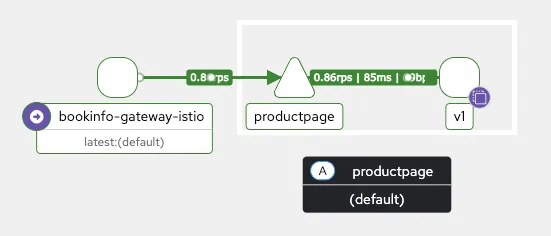
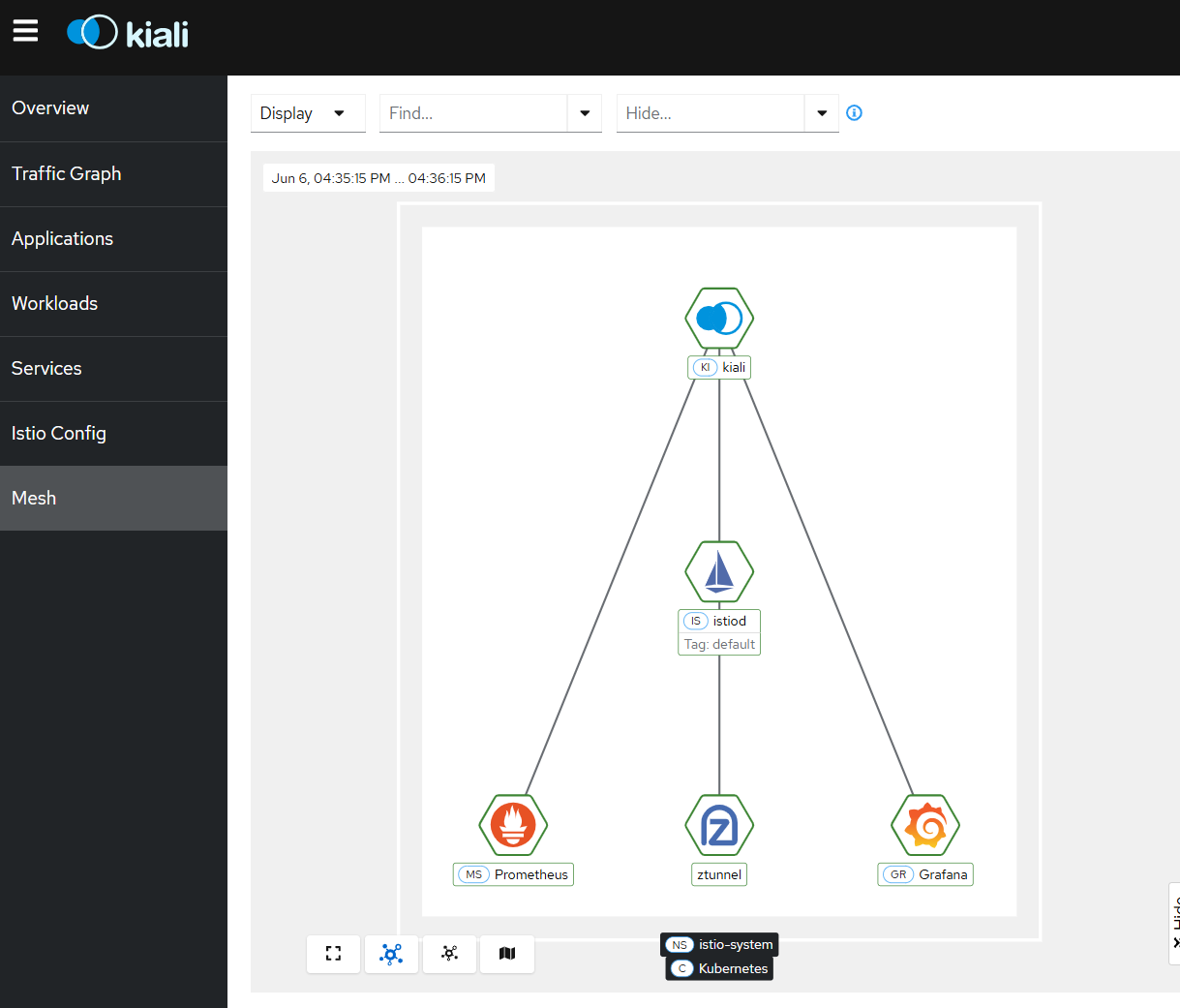
더불어 kiali에 mesh 메뉴가 생기며 아래와 같은 그림을 확인할 수 있다.
✔️ Adding your application to ambient
Add workloads to the mesh
Understand how to add workloads to an ambient mesh.
istio.io
# 디폴트 네임스페이서 모든 파드들에 ambient mesh 통신 적용 설정
PS C:\CODE> kubectl label namespace default istio.io/dataplane-mode=ambient
namespace/default labeled

# 사이트카가 없고 파드 수명 주기에 영향도 없다 -> mTLS 암호 통신 제공, L4 텔레메트리(메트릭) 제공
PS C:\CODE> docker exec -it myk8s-control-plane istioctl proxy-status
NAME                                                CLUSTER        CDS              LDS              EDS              RDS              ECDS        ISTIOD                     VERSION
bookinfo-gateway-istio-6cbd9bcd49-zdxn9.default     Kubernetes     SYNCED (20m)     SYNCED (20m)     SYNCED (18s)     SYNCED (20m)     IGNORED     istiod-86b6b7ff7-f4m9b     1.26.0
ztunnel-lcb9x.istio-system                          Kubernetes     IGNORED          IGNORED          IGNORED          IGNORED          IGNORED     istiod-86b6b7ff7-f4m9b     1.26.0
ztunnel-psq25.istio-system                          Kubernetes     IGNORED          IGNORED          IGNORED          IGNORED          IGNORED     istiod-86b6b7ff7-f4m9b     1.26.0
ztunnel-s9b87.istio-system                          Kubernetes     IGNORED          IGNORED          IGNORED          IGNORED          IGNORED     istiod-86b6b7ff7-f4m9b     1.26.0
ztunnel-xmqjf.istio-system                          Kubernetes     IGNORED          IGNORED          IGNORED          IGNORED          IGNORED     istiod-86b6b7ff7-f4m9b     1.26.0

PS C:\CODE> kubectl get pod
NAME                                      READY   STATUS    RESTARTS   AGE
bookinfo-gateway-istio-6cbd9bcd49-zdxn9   1/1     Running   0          14h
details-v1-766844796b-x6ljm               1/1     Running   0          15h
netshoot                                  1/1     Running   0          15h
productpage-v1-54bb874995-8bkxd           1/1     Running   0          15h
ratings-v1-5dc79b6bcd-695m5               1/1     Running   0          15h
reviews-v1-598b896c9d-w5grd               1/1     Running   0          15h
reviews-v2-556d6457d-nn65j                1/1     Running   0          15h
reviews-v3-564544b4d6-sb6md               1/1     Running   0          15h

# HBORN이 붙음
PS C:\CODE> docker exec -it myk8s-control-plane istioctl ztunnel-config workload
NAMESPACE          POD NAME                                     ADDRESS    NODE                 WAYPOINT PROTOCOL
default            details-v1-766844796b-x6ljm                  10.10.2.14 myk8s-worker2        None     HBONE
default            netshoot                                     10.10.0.7  myk8s-control-plane  None     HBONE
default            productpage-v1-54bb874995-8bkxd              10.10.2.16 myk8s-worker2        None     HBONE
...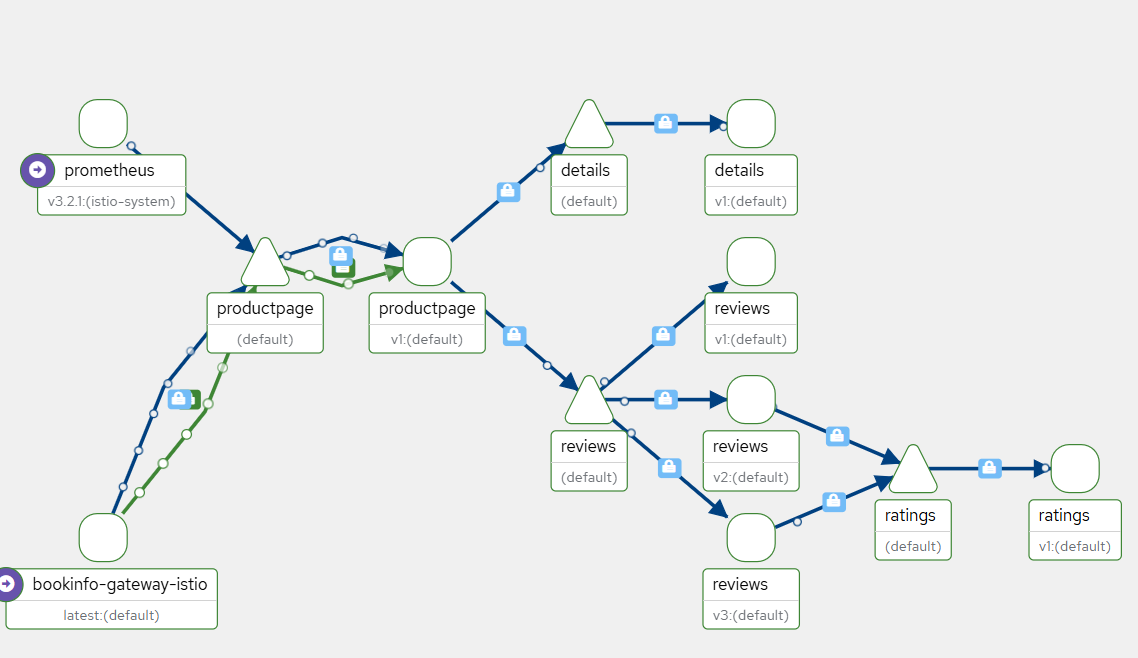

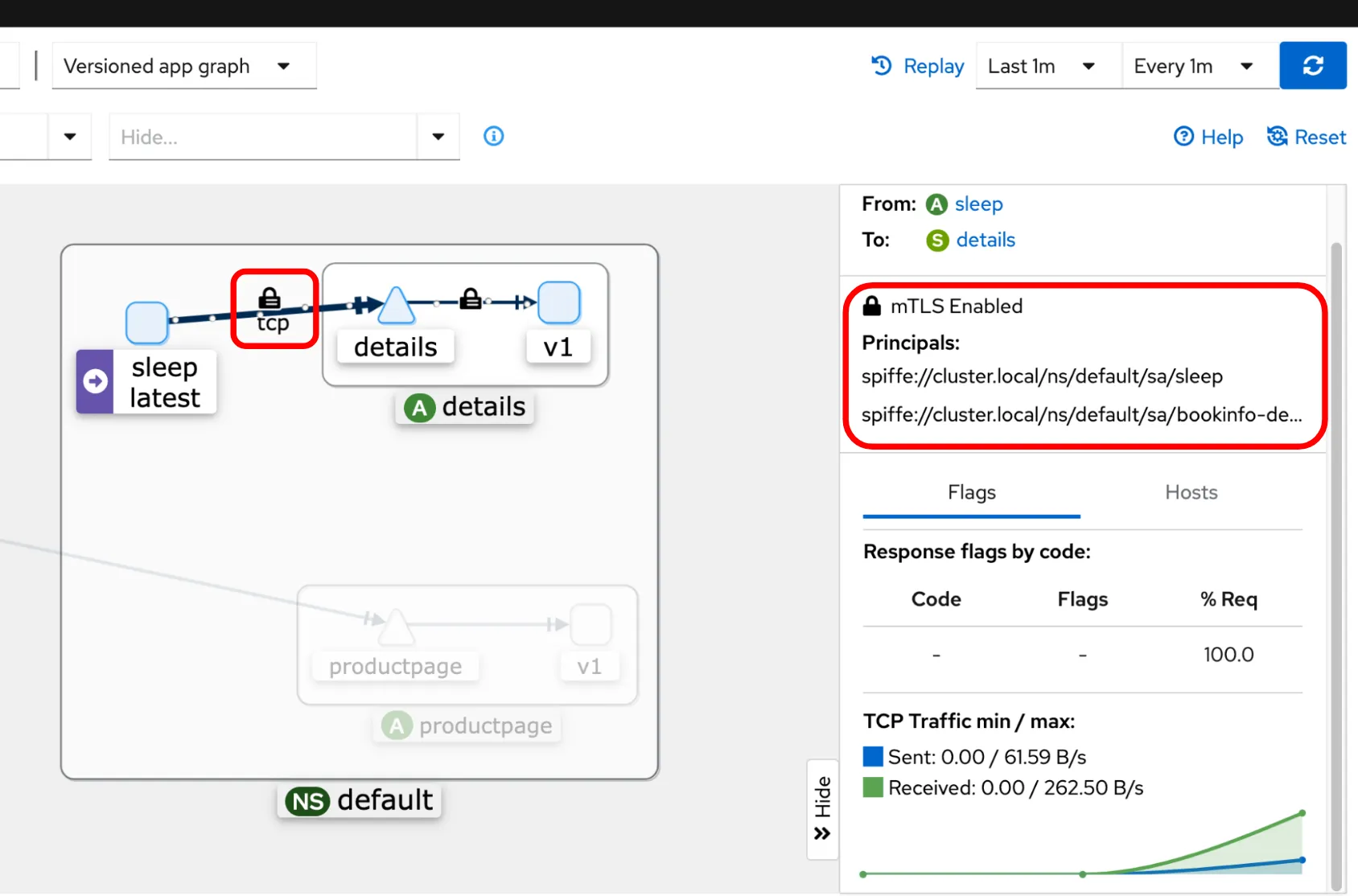
보안이 적용되고 TCP Stream이 뜨는 것을 확인할 수 있다. 파란 선은 TCP Connection이고 초록 선은 Health 상태를 말하는 것이다.
PS C:\CODE> docker exec -it myk8s-control-plane istioctl ztunnel-config workload --address 10.10.2.16
NAMESPACE POD NAME                        ADDRESS    NODE          WAYPOINT PROTOCOL
default   productpage-v1-54bb874995-8bkxd 10.10.2.16 myk8s-worker2 None     HBONE

PS C:\CODE> docker exec -it myk8s-control-plane istioctl ztunnel-config workload --address 10.10.2.16 -o json
[
    {
        "uid": "Kubernetes//Pod/default/productpage-v1-54bb874995-8bkxd",
        "workloadIps": [
            "10.10.2.16"
        ],
        "protocol": "HBONE",
        "name": "productpage-v1-54bb874995-8bkxd",
        "namespace": "default",
        "serviceAccount": "bookinfo-productpage",
        "workloadName": "productpage-v1",
        "workloadType": "pod",
        "canonicalName": "productpage",
        "canonicalRevision": "v1",
        "clusterId": "Kubernetes",
        "trustDomain": "cluster.local",
        "locality": {},
        "node": "myk8s-worker2",
        "status": "Healthy",
        "hostname": "",
        "capacity": 1,
        "applicationTunnel": {
            "protocol": ""
        }
    }
]
# 노드에서 ipset 확인 : 파드들의 ip를 멤버로 관리 확인
fish@jellyfish:~$ for node in control-plane worker worker2; do echo "node : myk8s-$node" ; docker exec -it myk8s-$node ipset list; echo; done
...
Members:
10.10.2.12 comment "46e6b156-19de-4374-bf65-86cd997f2cb7"
10.10.2.13 comment "285eccba-ea36-4e61-b940-2f5abc656399"
10.10.2.11 comment "e9a9e66e-720a-47f0-92ad-d59aacfece05"
10.10.2.15 comment "4588e05b-7032-436f-8564-3c207dc48fa1"
10.10.2.16 comment "8780cf91-32bd-412c-8ea8-ba7150ac80b8"
10.10.2.14 comment "50cb7bee-0c3d-4b98-aed3-724e2e330f18"
# istio-cni-node 로그 확인
kubectl -n istio-system logs -l k8s-app=istio-cni-node -f
# ztunnel 파드 로그 모니터링 : IN/OUT 트래픽 정보
PS C:\CODE> kubectl -n istio-system logs -l app=ztunnel -f
2025-06-06T11:45:48.723402Z info access connection complete src.addr=10.10.0.7:35818 src.workload="netshoot" src.namespace="default" src.identity="spiffe://cluster.local/ns/default/sa/netshoot" dst.addr=10.10.2.16:15008 dst.hbone_addr=10.10.2.16:9080 dst.service="productpage.default.svc.cluster.local" dst.workload="productpage-v1-54bb874995-8bkxd" dst.namespace="default" dst.identity="spiffe://cluster.local/ns/default/sa/bookinfo-productpage" direction="inbound" bytes_sent=15245 bytes_recv=90 duration="27ms"
2025-06-06T11:45:48.724310Z info access connection complete src.addr=10.10.0.7:52134 src.workload="netshoot" src.namespace="default" src.identity="spiffe://cluster.local/ns/default/sa/netshoot" dst.addr=10.10.2.16:15008 dst.hbone_addr=10.10.2.16:9080 dst.service="productpage.default.svc.cluster.local" dst.workload="productpage-v1-54bb874995-8bkxd" dst.namespace="default" dst.identity="spiffe://cluster.local/ns/default/sa/bookinfo-productpage" direction="outbound" bytes_sent=90 bytes_recv=15245 duration="29ms"
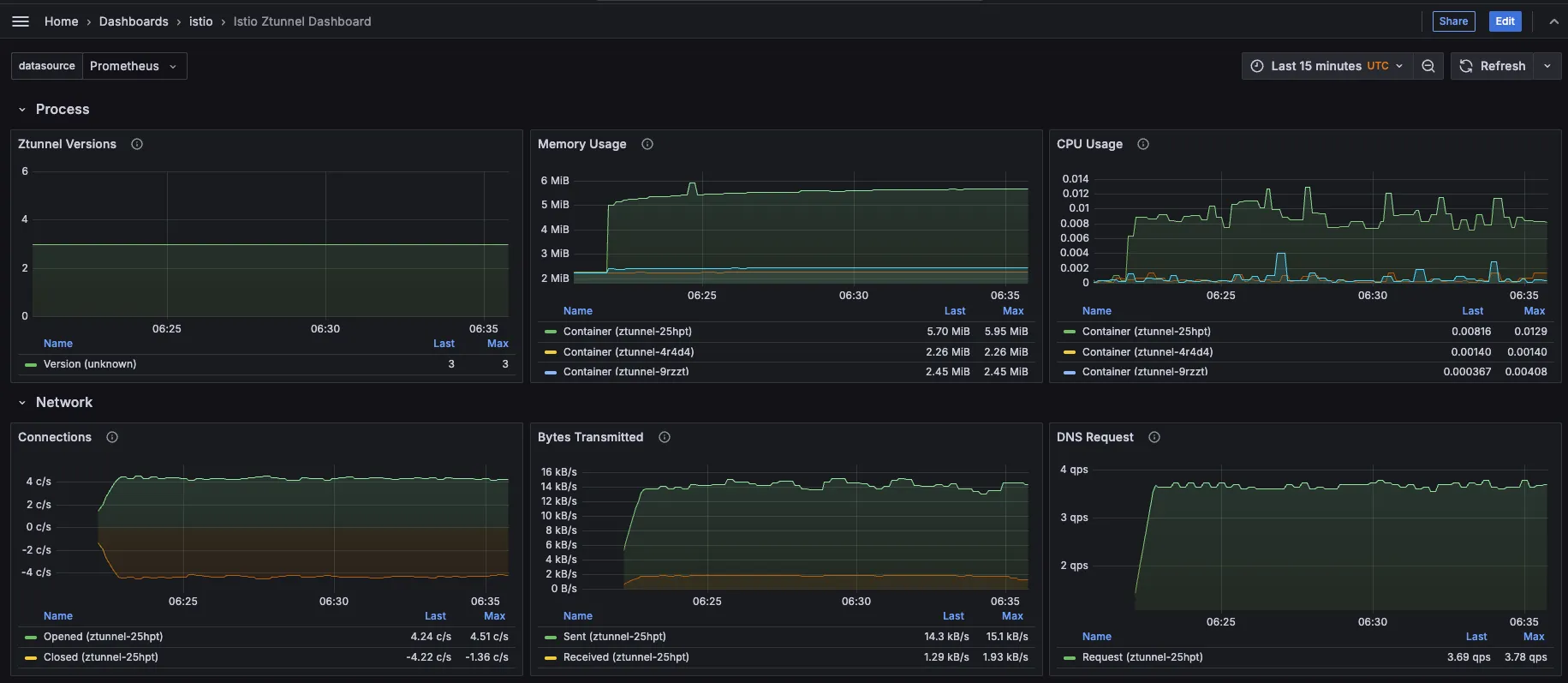
# netshoot 파드만 ambient mode 에서 제외해보자
PS C:\CODE> docker exec -it myk8s-control-plane istioctl ztunnel-config workload
...
PS C:\CODE> docker exec -it myk8s-control-plane istioctl ztunnel-config workload
...
2️⃣ 상세 정보 분석
✔️ istio-proxy 정보 확인
#
docker exec -it myk8s-control-plane istioctl proxy-status
docker exec -it myk8s-control-plane istioctl proxy-config listener deploy/bookinfo-gateway-istio
docker exec -it myk8s-control-plane istioctl proxy-config listener deploy/bookinfo-gateway-istio --waypoint
docker exec -it myk8s-control-plane istioctl proxy-config listener deploy/bookinfo-gateway-istio --port 80
docker exec -it myk8s-control-plane istioctl proxy-config listener deploy/bookinfo-gateway-istio --port 80 -o json

docker exec -it myk8s-control-plane istioctl proxy-config route deploy/bookinfo-gateway-istio
docker exec -it myk8s-control-plane istioctl proxy-config route deploy/bookinfo-gateway-istio --name http.80
docker exec -it myk8s-control-plane istioctl proxy-config route deploy/bookinfo-gateway-istio --name http.80 -o json

docker exec -it myk8s-control-plane istioctl proxy-config cluster deploy/bookinfo-gateway-istio
docker exec -it myk8s-control-plane istioctl proxy-config cluster deploy/bookinfo-gateway-istio --fqdn productpage.default.svc.cluster.local -o json

docker exec -it myk8s-control-plane istioctl proxy-config endpoint deploy/bookinfo-gateway-istio --status healthy
docker exec -it myk8s-control-plane istioctl proxy-config endpoint deploy/bookinfo-gateway-istio --cluster 'outbound|9080||productpage.default.svc.cluster.local' -o json

docker exec -it myk8s-control-plane istioctl proxy-config secret deploy/bookinfo-gateway-istio
docker exec -it myk8s-control-plane istioctl proxy-config secret deploy/bookinfo-gateway-istio -o json

docker exec -it myk8s-control-plane istioctl proxy-config bootstrap deploy/bookinfo-gateway-istio
✔️ ztunnel-config
# A group of commands used to update or retrieve Ztunnel configuration from a Ztunnel instance.
docker exec -it myk8s-control-plane istioctl ztunnel-config
  all         Retrieves all configuration for the specified Ztunnel pod.
  certificate Retrieves certificate for the specified Ztunnel pod.
  connections Retrieves connections for the specified Ztunnel pod.
  log         Retrieves logging levels of the Ztunnel instance in the specified pod.
  policy      Retrieves policies for the specified Ztunnel pod.
  service     Retrieves services for the specified Ztunnel pod.
  workload    Retrieves workload configuration for the specified Ztunnel pod.
  ...

PS C:\CODE> docker exec -it myk8s-control-plane istioctl ztunnel-config service
NAMESPACE      SERVICE NAME            SERVICE VIP  WAYPOINT ENDPOINTS
default        bookinfo-gateway-istio  10.200.1.64  None     1/1
default        details                 10.200.1.212 None     1/1
default        kubernetes              10.200.1.1   None     2/2
default        productpage             10.200.1.185 None     1/1
default        ratings                 10.200.1.205 None     1/1
default        reviews                 10.200.1.200 None     3/3
istio-system   grafana                 10.200.1.63  None     1/1
istio-system   istiod                  10.200.1.110 None     1/1
istio-system   jaeger-collector        10.200.1.248 None     1/1
istio-system   kiali                   10.200.1.199 None     1/1
istio-system   loki                    10.200.1.162 None     1/1
istio-system   loki-headless                        None     1/1
istio-system   loki-memberlist                      None     1/1
istio-system   prometheus              10.200.1.65  None     1/1
istio-system   tracing                 10.200.1.60  None     1/1
istio-system   zipkin                  10.200.1.98  None     1/1
kube-system    kube-dns                10.200.1.10  None     2/2
metallb-system metallb-webhook-service 10.200.1.193 None     1/1

docker exec -it myk8s-control-plane istioctl ztunnel-config service --service-namespace default --node myk8s-worker2 -o json
...

PS C:\CODE> docker exec -it myk8s-control-plane istioctl ztunnel-config workload --workload-namespace default --node myk8s-worker2
NAMESPACE POD NAME                                ADDRESS    NODE                WAYPOINT PROTOCOL
default   bookinfo-gateway-istio-6cbd9bcd49-zdxn9 10.10.2.17 myk8s-worker2       None     TCP
default   details-v1-766844796b-x6ljm             10.10.2.14 myk8s-worker2       None     HBONE
default   kubernetes                              172.20.0.4                     None     TCP
default   kubernetes                              172.20.0.5                     None     TCP
default   netshoot                                10.10.0.7  myk8s-control-plane None     HBONE
default   productpage-v1-54bb874995-8bkxd         10.10.2.16 myk8s-worker2       None     HBONE
default   ratings-v1-5dc79b6bcd-695m5             10.10.2.12 myk8s-worker2       None     HBONE
default   reviews-v1-598b896c9d-w5grd             10.10.2.13 myk8s-worker2       None     HBONE
default   reviews-v2-556d6457d-nn65j              10.10.2.11 myk8s-worker2       None     HBONE
default   reviews-v3-564544b4d6-sb6md             10.10.2.15 myk8s-worker2       None     HBONE

PS C:\CODE> docker exec -it myk8s-control-plane istioctl ztunnel-config workload --workload-namespace default --node myk8s-worker -o json
...
    {
        "uid": "Kubernetes//Pod/default/details-v1-766844796b-x6ljm",
        "workloadIps": [
            "10.10.2.14"
        ],
        "protocol": "HBONE",
        "name": "details-v1-766844796b-x6ljm",
        "namespace": "default",
        "serviceAccount": "bookinfo-details",
        "workloadName": "details-v1",
        "workloadType": "pod",
        "canonicalName": "details",
        "canonicalRevision": "v1",
        "clusterId": "Kubernetes",
        "trustDomain": "cluster.local",
        "locality": {},
        "node": "myk8s-worker2",
        "status": "Healthy",
        "hostname": "",
        "capacity": 1,
        "applicationTunnel": {
            "protocol": ""
        }
    },
...
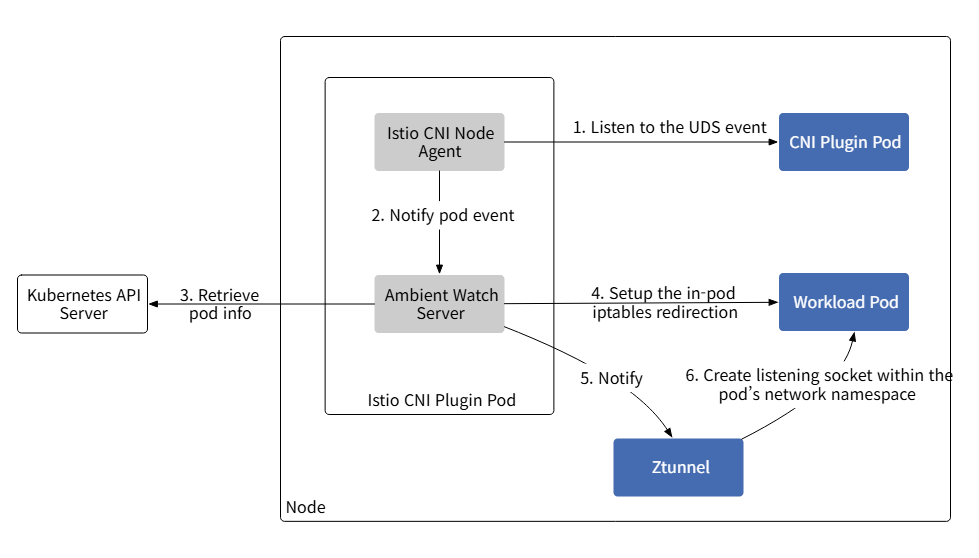
✔️ 도식화

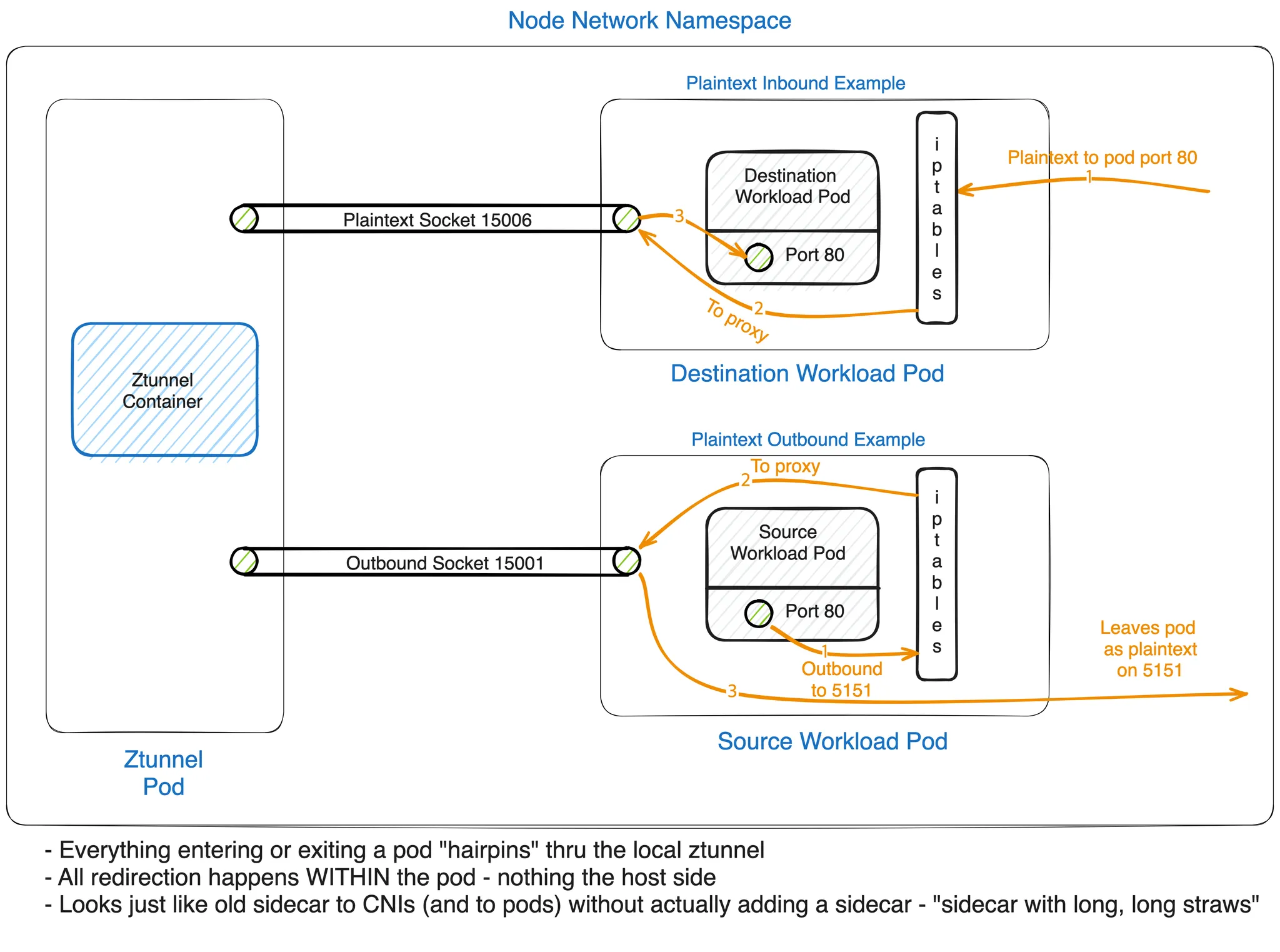
Role of Specific Ports
- 15008(HBONE 소켓) : HBONE 프로토콜을 사용하여 HTTP 기반 트래픽을 투명하게 처리
- 15006(일반 텍스트 소켓) : 포드 간 통신을 위해 메시 내의 암호화되지 않은 트래픽을 관리
- 15001(아웃바운드 소켓) : 아웃바운드 트래픽을 제어하고 외부 서비스 액세스에 대한 정책을 시행
0x539 마크는 Istio 프록시(예: ztunnel)에서 발생하는 트래픽을 식별한다. 이 마크는 프록시에서 처리된 패킷을 구별하여 재처리되거나 잘못된 경로로 지정되지 않도록한다.
0x111 마크는 Istio 메시 내의 연결 수준 표시에 사용되며, 이는 프록시에 의해 연결이 처리되었음을 나타낸다. iptables의 CONNMARK 모듈은 이 마크를 전체 연결로 확장하여 후속 패킷 매칭 속도를 높인다.
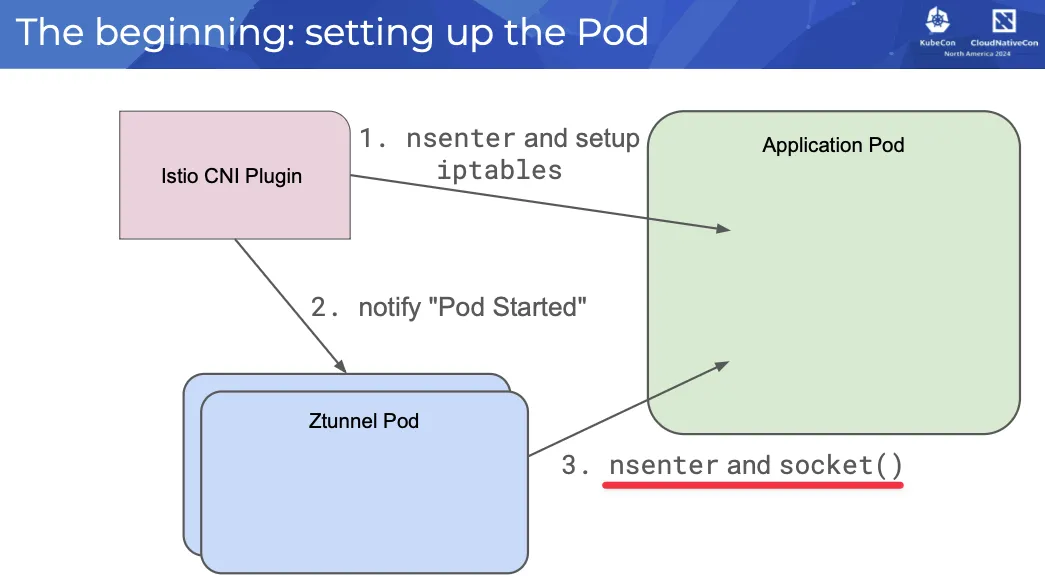
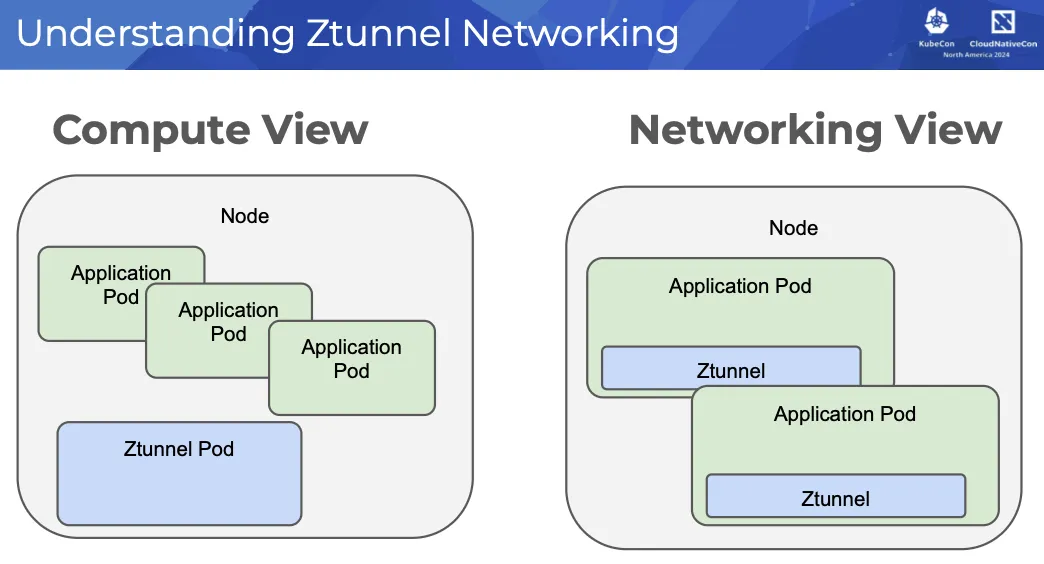
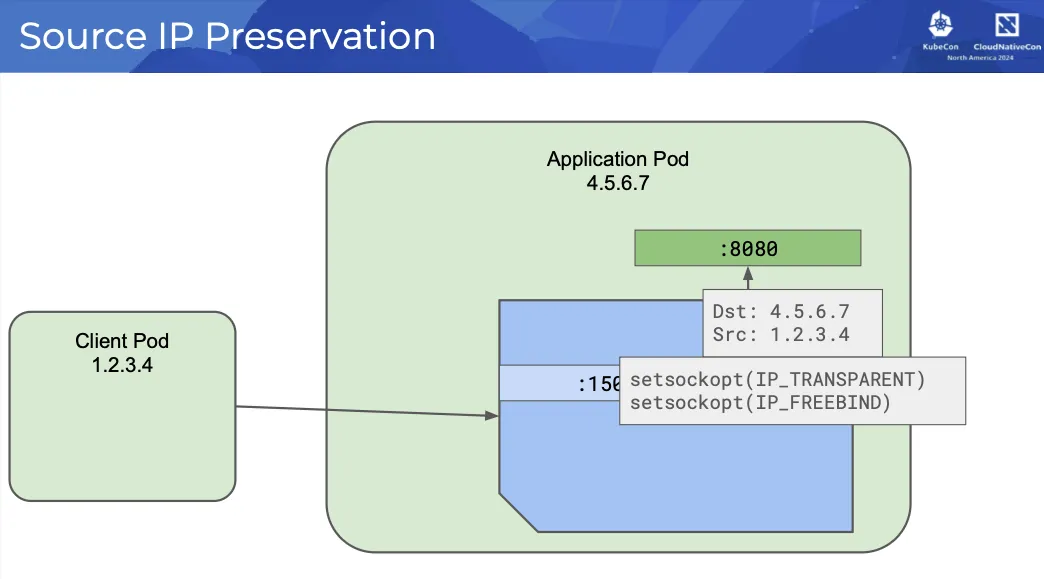
새로운 앰비언트 캡처 모델의 최종 결과는 모든 트래픽 캡처와 리디렉션이 포드의 네트워크 네임스페이스 내부에서 발생한다는 것이다. 노드, CNI 및 기타 모든 것에 대해 포드 내부에 사이드카 프록시가 있는 것처럼 보인다. 비록 포드에서 사이드카 프록시가 전혀 실행되지 않더라도 말이다.

✔️ productpage
#
PPOD=$(kubectl get pod -l app=productpage -o jsonpath='{.items[0].metadata.name}')

kubectl pexec $PPOD -it -T -- bash
iptables-save
...

# DNS 트래픽에 대해 연결 추적을 설정, 이후 마크 기반으로 리디렉션 여부를 제어
iptables -t raw -S
...
-A PREROUTING -j ISTIO_PRERT
-A OUTPUT -j ISTIO_OUTPUT
-A ISTIO_OUTPUT -p udp -m mark --mark 0x539/0xfff -m udp --dport 53 -j CT --zone 1
-A ISTIO_PRERT -p udp -m mark ! --mark 0x539/0xfff -m udp --sport 53 -j CT --zone 1


# 특정 마크가 붙은 트래픽을 식별해서 추후 NAT에서 건너뛰게 함
iptables -t mangle -S
...
## 들어오는 패킷을 ISTIO_PRERT 체인으로 전달
-A PREROUTING -j ISTIO_PRERT

## 로컬 생성 트래픽도 마찬가지로 처리
-A OUTPUT -j ISTIO_OUTPUT

## 연결 추적에 저장된 마크를 복원
-A ISTIO_OUTPUT -m connmark --mark 0x111/0xfff -j CONNMARK --restore-mark --nfmask 0xffffffff --ctmask 0xffffffff

## 마크가 특정 값일 경우 새로운 마크로 설정
-A ISTIO_PRERT -m mark --mark 0x539/0xfff -j CONNMARK --set-xmark 0x111/0xfff


# 트래픽 리디렉션 실행
iptables -t nat -S
...
## 특정 IP 예외 처리 (프록시 자체나 메타데이터 주소 등)
-A ISTIO_OUTPUT -d 169.254.7.127/32 -p tcp -m tcp -j ACCEPT

## DNS 요청(udp/53) 을 15053 포트로 리디렉션
-A ISTIO_OUTPUT ! -o lo -p udp -m mark ! --mark 0x539/0xfff -m udp --dport 53 -j REDIRECT --to-ports 15053

## TCP 기반 DNS 요청 도 15053으로 리디렉션
-A ISTIO_OUTPUT ! -d 127.0.0.1/32 -p tcp -m tcp --dport 53 -m mark ! --mark 0x539/0xfff -j REDIRECT --to-ports 15053

## 특정 마크가 붙은 트래픽은 리디렉션에서 제외
-A ISTIO_OUTPUT -p tcp -m mark --mark 0x111/0xfff -j ACCEPT

## 루프백 인터페이스로 향하는 트래픽은 건너뜀
-A ISTIO_OUTPUT ! -d 127.0.0.1/32 -o lo -j ACCEPT

## 나머지 TCP 트래픽은 15001 로 리디렉션
-A ISTIO_OUTPUT ! -d 127.0.0.1/32 -p tcp -m mark ! --mark 0x539/0xfff -j REDIRECT --to-ports 15001

## 특정 메타데이터 IP에서 온 트래픽은 리디렉션 예외
-A ISTIO_PRERT -s 169.254.7.127/32 -p tcp -m tcp -j ACCEPT

## 들어오는 외부 TCP 트래픽을 inbound 포트(15006) 로 리디렉션
-A ISTIO_PRERT ! -d 127.0.0.1/32 -p tcp -m tcp ! --dport 15008 -m mark ! --mark 0x539/0xfff -j REDIRECT --to-ports 15006

# 요약
## DNS 트래픽 → 15053 포트로 리디렉션 (Envoy가 DNS를 프록시)
## TCP 트래픽 (출발지/도착지에 따라) → 15001 또는 15006 포트로 리디렉션
## 특정 마크 (0x539, 0x111)나 주소는 리디렉션 제외
## conntrack 및 mark 시스템으로 트래픽 상태 관리 및 리디렉션 조건 제어


# 15001,15006,15008 확인
ss -tnp
ss -tnlp
State             Recv-Q            Send-Q                       Local Address:Port                          Peer Address:Port            Process
LISTEN            0                 128                              127.0.0.1:15053                              0.0.0.0:*
LISTEN            0                 128                                  [::1]:15053                                 [::]:*
LISTEN            0                 128                                      *:15001                                    *:*
LISTEN            0                 128                                      *:15006                                    *:*
LISTEN            0                 128                                      *:15008                                    *:*
LISTEN            0                 2048                                     *:9080                                     *:*                users:(("gunicorn",pid=18,fd=5),("gunicorn",pid=17,fd=5),("gunicorn",pid=16,fd=5),("gunicorn",pid=15,fd=5),("gunicorn",pid=14,fd=5),("gunicorn",pid=13,fd=5),("gunicorn",pid=12,fd=5),("gunicorn",pid=11,fd=5),("gunicorn",pid=1,fd=5))

# 암호화 확인
tcpdump -i eth0 -A -s 0 -nn 'tcp port 15008'

apk update && apk add ngrep
ngrep -tW byline -d eth0 '' 'tcp port 15008'

#
ngrep -tW byline -d eth0 '' 'tcp port 15001'
ngrep -tW byline -d eth0 '' 'tcp port 15006'

#
ls -l /var/run/ztunnel

exit
3️⃣ Verify mutual TLS is enabled
Verify mutual TLS is enabled
Understand how to verify mTLS is enabled among workloads in an ambient mesh.
istio.io
✔️ Validate mTLS using workload’s ztunnel configurations
PS C:\CODE> docker exec -it myk8s-control-plane istioctl ztunnel-config workload
NAMESPACE          POD NAME                                     ADDRESS    NODE                 WAYPOINT PROTOCOL
default            bookinfo-gateway-istio-6cbd9bcd49-zdxn9      10.10.2.17 myk8s-worker2        None     TCP
default            details-v1-766844796b-x6ljm                  10.10.2.14 myk8s-worker2        None     HBONE
✔️ Validate mTLS from metrics
istio_tcp_connections_opened_total{
  app="ztunnel",
  connection_security_policy="mutual_tls",
  destination_principal="spiffe://cluster.local/ns/default/sa/bookinfo-details",
  destination_service="details.default.svc.cluster.local",
  reporter="source",
  request_protocol="tcp",
  response_flags="-",
  source_app="curl",
  source_principal="spiffe://cluster.local/ns/default/sa/curl",source_workload_namespace="default",
  ...}
✔️ Validate with Kiali dashboard
✔️ Validate with tcpdump
# tcpdump -nAi eth0 port 9080 or port 15008

#
DPOD=$(kubectl get pods -l app=details -o jsonpath="{.items[0].metadata.name}")
echo $DPOD

#
kubectl pexec $DPOD -it -T -- sh -c 'tcpdump -nAi eth0 port 9080 or port 15008'
...
4️⃣ Secure Application Access : L4 Authorization Policy
Istio의 보안 정책의 레이어 4(L4) 기능은 ztunnel에서 지원되며 앰비언트 모드로 사용할 수 있다. 또한 클러스터에 이를 지원하는 CNI 플러그인이 있는 경우에도 Kubernetes 네트워크 정책은 계속 작동하며 심층적인 방어 기능을 제공하는 데 사용할 수 있다. ztunnel 및 웨이포인트 프록시의 계층화를 통해 주어진 워크로드에 대해 레이어 7(L7) 처리를 활성화할지 여부를 선택할 수 있다. 이제 정책을 두 곳에서 시행할 수 있기 때문에 이해해야 할 사항이 있다.
# netshoot 파드만 ambient mode 다시 참여
PS C:\CODE> kubectl label pod netshoot istio.io/dataplane-mode=ambient --overwrite
pod/netshoot labeled
PS C:\CODE> docker exec -it myk8s-control-plane istioctl ztunnel-config workload
...
# L4 Authorization Policy 신규 생성
apiVersion: security.istio.io/v1
kind: AuthorizationPolicy
metadata:
name: productpage-viewer
namespace: default
spec:
selector:
matchLabels:
app: productpage
action: ALLOW
rules:
- from:
- source:
principals:
- cluster.local/ns/default/sa/netshootPS C:\CODE\kubernetes\istio\manifest\final> kubectl apply -f .\l4.yaml
authorizationpolicy.security.istio.io/productpage-viewer created
PS C:\CODE> kubectl get authorizationpolicy
NAME ACTION AGE
productpage-viewer ALLOW 43s
# ztunnel 파드 로그 모니터링
kubectl logs ds/ztunnel -n istio-system -f | grep -E RBAC
# L4 Authorization Policy 동작 확인
PS C:\CODE> kubectl get svc bookinfo-gateway-istio -o jsonpath='{.status.loadBalancer.ingress[0].ip}'
172.20.255.201
# 차단
fish@jellyfish:~$ docker exec -it mypc curl 172.20.255.201/productpage
upstream connect error or disconnect/reset before headers. reset reason: connection termination
# 허용
PS C:\CODE> kubectl exec -it netshoot -- curl -sS productpage:9080/productpage | findstr -i title
<title>Simple Bookstore App</title>
# 반복 호출
PS C:\CODE> while($true){kubectl exec -it netshoot -- curl -sS productpage:9080/productpage | findstr -i title}
<title>Simple Bookstore App</title>
<title>Simple Bookstore App</title>
...# L4 Authorization Policy 업데이트
apiVersion: security.istio.io/v1
kind: AuthorizationPolicy
metadata:
name: productpage-viewer
namespace: default
spec:
selector:
matchLabels:
app: productpage
action: ALLOW
rules:
- from:
- source:
principals:
- cluster.local/ns/default/sa/netshoot
- cluster.local/ns/default/sa/bookinfo-gateway-istioPS C:\CODE\kubernetes\istio\manifest\final> kubectl apply -f .\l4_1.yaml
authorizationpolicy.security.istio.io/productpage-viewer configured
# 허용 확인
PS C:\CODE> docker exec -it mypc curl $GWLB/productpage | findstr -i title
<title>Simple Bookstore App</title>
5️⃣ Configure waypoint proxies
Configure waypoint proxies
Gain the full set of Istio features with optional Layer 7 proxies.
istio.io
웨이포인트 프록시는 정의된 워크로드 집합에 레이어 7(L7) 처리를 추가하기 위해 Envoy 기반 프록시를 선택적으로 배포하는 것이다. 웨이포인트 프록시는 애플리케이션과 독립적으로 설치, 업그레이드 및 확장되며, 애플리케이션 소유자는 이러한 프록시의 존재를 인식하지 않아야 한다. 각 워크로드와 함께 에너포 프록시 인스턴스를 실행하는 사이드카 데이터 플레인 모드에 비해 필요한 프록시 수를 크게 줄일 수 있다. 웨이포인트 또는 웨이포인트 세트는 보안 경계가 비슷한 애플리케이션 간에 공유할 수 있다. 이는 특정 워크로드의 모든 인스턴스 또는 네임스페이스의 모든 워크로드일 수 있다. 사이드카 모드와는 달리, 앰비언트 모드에서는 정책이 목적지 경유지에 의해 시행된다. 여러 면에서 경유지는 자원(이름 공간, 서비스 또는 포드)으로 가는 관문 역할을 합니다. Istio는 자원으로 들어오는 모든 트래픽이 경유지를 통과하도록 강제하며, 이는 그 자원에 대한 모든 정책을 강제한다.
✔️ Do you need a waypoint proxy?
앰비언트의 레이어드 접근 방식을 통해 사용자는 no mesh에서 보안 L4 오버레이, 전체 L7 처리로 원활하게 전환하면서 Istio를 보다 점진적인 방식으로 채택할 수 있다. 앰비언트 모드의 대부분의 기능은 ztunnel 노드 프록시에 의해 제공된다. ztunnel은 계층 4(L4)에서만 트래픽을 처리하도록 설계되어 공유 구성 요소로 안전하게 작동할 수 있다. 웨이포인트로 리디렉션을 구성하면 트래픽이 ztunnel을 통해 해당 웨이포인트로 전달된다. 애플리케이션에 다음 L7 메쉬 기능이 필요한 경우 웨이포인트 프록시를 사용해야 한다.
✔️ Deploy a waypoint proxy
PS C:\CODE> kubectl get po
NAME                                      READY   STATUS    RESTARTS   AGE
bookinfo-gateway-istio-6cbd9bcd49-zdxn9   1/1     Running   0          21h
details-v1-766844796b-x6ljm               1/1     Running   0          22h
netshoot                                  1/1     Running   0          22h
productpage-v1-54bb874995-8bkxd           1/1     Running   0          22h
ratings-v1-5dc79b6bcd-695m5               1/1     Running   0          22h
reviews-v1-598b896c9d-w5grd               1/1     Running   0          22h
reviews-v2-556d6457d-nn65j                1/1     Running   0          22h
reviews-v3-564544b4d6-sb6md               1/1     Running   0          22h

PS C:\CODE> kubectl describe pod bookinfo-gateway-istio-6cbd9bcd49-zdxn9 | findstr 'Service Account'
Service Account:  bookinfo-gateway-istio

istioctl waypoint generate --for service -n default
apiVersion: gateway.networking.k8s.io/v1
kind: Gateway
metadata:
  labels:
    istio.io/waypoint-for: service
  name: waypoint
  namespace: default
spec:
  gatewayClassName: istio-waypoint
  listeners:
  - name: mesh
    port: 15008
    protocol: HBONE

PS C:\CODE> docker exec -it myk8s-control-plane istioctl waypoint apply -n default
✅ waypoint default/waypoint applied

PS C:\CODE> kubectl get gateway waypoint -o yaml
...

PS C:\CODE> kubectl get pod -l service.istio.io/canonical-name=waypoint -owide
NAME                      READY   STATUS    RESTARTS   AGE   IP           NODE            NOMINATED NODE   READINESS GATES
waypoint-66b59898-78fb8   1/1     Running   0          97s   10.10.2.18   myk8s-worker2   <none>           <none>

PS C:\CODE> docker exec -it myk8s-control-plane istioctl waypoint list
NAME         REVISION     PROGRAMMED
waypoint     default      True

PS C:\CODE> docker exec -it myk8s-control-plane istioctl waypoint status
NAMESPACE     NAME         STATUS     TYPE           REASON         MESSAGE
default       waypoint     True       Programmed     Programmed     Resource programmed, assigned to service(s) waypoint.default.svc.cluster.local:15008

PS C:\CODE> docker exec -it myk8s-control-plane istioctl proxy-status
NAME                                                CLUSTER        CDS                LDS                EDS               RDS                ECDS        ISTIOD                     VERSION
bookinfo-gateway-istio-6cbd9bcd49-zdxn9.default     Kubernetes     SYNCED (2m12s)     SYNCED (2m12s)     SYNCED (2m8s)     SYNCED (2m12s)     IGNORED     istiod-86b6b7ff7-f4m9b     1.26.0
waypoint-66b59898-78fb8.default                     Kubernetes     SYNCED (2m8s)      SYNCED (2m8s)      IGNORED           IGNORED            IGNORED     istiod-86b6b7ff7-f4m9b     1.26.0
...

PS C:\CODE> docker exec -it myk8s-control-plane istioctl proxy-config secret deploy/waypoint
RESOURCE NAME     TYPE           STATUS     VALID CERT     SERIAL NUMBER                        NOT AFTER                NOT BEFORE
default           Cert Chain     ACTIVE     true           ea4bb90d48d8ca22d217348382632a0b     2025-06-07T14:44:08Z     2025-06-06T14:42:08Z
ROOTCA            CA             ACTIVE     true           82ce97ff2066908320a67b6c00f651d8     2035-06-03T14:40:02Z     2025-06-05T14:40:02Z

kubectl pexec waypoint-66b59898-dlrj4 -it -T -- bash
----------------------------------------------
ip -c a

curl -s http://localhost:15020/stats/prometheus

ss -tnlp
State           Recv-Q          Send-Q                   Local Address:Port                    Peer Address:Port         Process
LISTEN          0               4096                         127.0.0.1:15000                        0.0.0.0:*             users:(("envoy",pid=18,fd=18))
LISTEN          0               4096                           0.0.0.0:15008                        0.0.0.0:*             users:(("envoy",pid=18,fd=35))
LISTEN          0               4096                           0.0.0.0:15008                        0.0.0.0:*             users:(("envoy",pid=18,fd=34))
LISTEN          0               4096                           0.0.0.0:15021                        0.0.0.0:*             users:(("envoy",pid=18,fd=23))
LISTEN          0               4096                           0.0.0.0:15021                        0.0.0.0:*             users:(("envoy",pid=18,fd=22))
LISTEN          0               4096                           0.0.0.0:15090                        0.0.0.0:*             users:(("envoy",pid=18,fd=21))
LISTEN          0               4096                           0.0.0.0:15090                        0.0.0.0:*             users:(("envoy",pid=18,fd=20))
LISTEN          0               4096                                 *:15020                              *:*             users:(("pilot-agent",pid=1,fd=11))

ss -tnp

ss -xnlp
ss -xnp

exit
✔️ 실습 완료 후 리소스 삭제
kind delete cluster --name myk8s; docker rm -f mypc'Istio' 카테고리의 다른 글
| Ambient Mode ztunnel Trouble Shooting (4) | 2025.06.09 |
|---|---|
| Ambient Mesh (2) (3) | 2025.06.05 |
| Ambient Mesh (1) (4) | 2025.06.05 |
| Istio Traffic Flow (1) | 2025.05.31 |
| DNS 프록시 이해 (0) | 2025.05.31 |


